

-
-
-
-
Building blocks of the data model
-
Basic concepts
-
Classes
-
Key fields
-
Local lookup lists
-
Fields and data types
-
Defining the columns of a table
-
Relations between classes
-
Global lookup lists
-
Filters
-
Universal connected classes
-
Deleting foreign records
-
Class inheritance
-
Storage of personal data on test and develop environment (scrambling)
-
Building blocks of the data model
-
-
User interface versions
-
Building blocks for user interface design
-
Adding styles with a css
-
Surrounding page
-
Changing snippets
-
Creating a custom login page (pre 3.4)
-
Creating a custom login page
-
Using velocity templates within the blueprint
-
Create your own web pages
-
HTML delivery requirements
-
How to customize system mails
-
User interface versions
-
-
Resource files
-
Velocity - How does it work?
-
Quick Velocity Tutorial
-
Debugging velocity scripts
-
Velocity Command Reference
-
Script Editor Tutorial
-
Using velocity for calculations
-
Using predefined forms in a html design
-
Velocity forms
-
Data field identifiers
-
Macros and methods
-
Velocity library
-
Velocity: using the #macro command
-
velocity and xml
-
Using AJAX in your velocity scripts
-
Resource files
-
-
-
Argon2 password conversion
-
Introduction to security
-
Secure development
-
Security certification
-
Security Exam
-
Field properties concerning security
-
Developing user groups securely
-
Security considerations for user interface
-
Secure file organization
-
Securely using the request
-
Cross Site Scripting (XSS)
-
Other options concerning secure development
-
Security analysis
-
Secure deployment
-
Secure application management
-
Scrambling of testdata
-
Anonymization of personal data
-
Using robots.txt
-
Permission settings
-
Security measures
-
Data encryption
-
Argon2 password conversion
-
-
Search Engine Optimization
-
OTP
-
User Interface migration guide
-
User account management
-
Instructies voor implementatie van visueel editen van nieuwsbrieven
-
Login as another user
-
Support
-
More information about moving to User Interface Version 4.0
-
Standaard page layout
-
Sections moved to layout
-
Aanpassingen in release 2024-7
-
Media library
-
Aanpassingen in release 2024-10
-
Analytics and Matomo
-
Registration forms
-
How to change names of classes and fields?
-
Responsible Disclosure Policy
-
How to upload a blob in Velocity?
-
Aanpassingen in release 2024-2
-
Instances
-
Componenten in onze technologie
-
Google Analytics
-
Street and City helper (postcodecheck)
-
Responsible disclosure-beleid
-
Postcode check service (straat en huisnummer) kosten
-
Expressions
-
Regular Expression Reference
-
Dashboards
A dashboard is a part of an application that is designed to be easy to read and control (similar to a car's dashboard). Its function is to provide a "bird's eye view" of what is going on in the application (and its surroundings).
In the CrossmarX Application Engine a dashboard consists of one or more pages (presented as tab panels). Each tab panel consists of rectangular blocks. Each block contains a small piece of information. The source of this information may be the applications database or an external source. When many external sources are used, the dashboards role is like a portal application.
How to create a dashboard
A dashboard can only be created by the application manager. Click the "Dashboard pages" button in the backstage, then create a new page. You have to set one or more user groups, otherwise the page will NOT be displayed. You can add the number of rows.
A page consists of rows of blocks. You can add blocks by pressing the "Add dashboard block"-button in the details view of a row. A block can have a title and should have content. Content can contain (a combination of) the following items:
- html or velocity content
HTML code, that may contain velocity. In case you have a velocity script on file, you can also use #parse('/myapp/myfile').
- a stored query
It is possible to select a stored query. The query results can be shown in real time, but you can also schedule the queries to be cached once a day or once an hour. For time-consuming queries this will speed up the dashboards. You can add a filter field so you can change value of the filter on the dashboard. More on queries here.
- Velocity file
A direct url to a Velocity file
- a gadget
A gadget is a small piece of web content that can be placed in a dashboard block. Gadgets can be defined independently from a particular dashboard, and added to a list of available gadgets. When defining a particular block, gadgets can be selected from this list to be added.
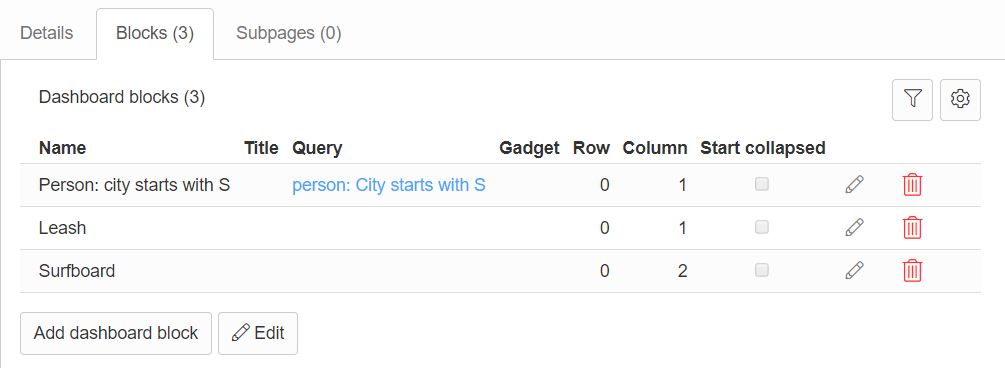
It's possible to change the column of a block. See image below:
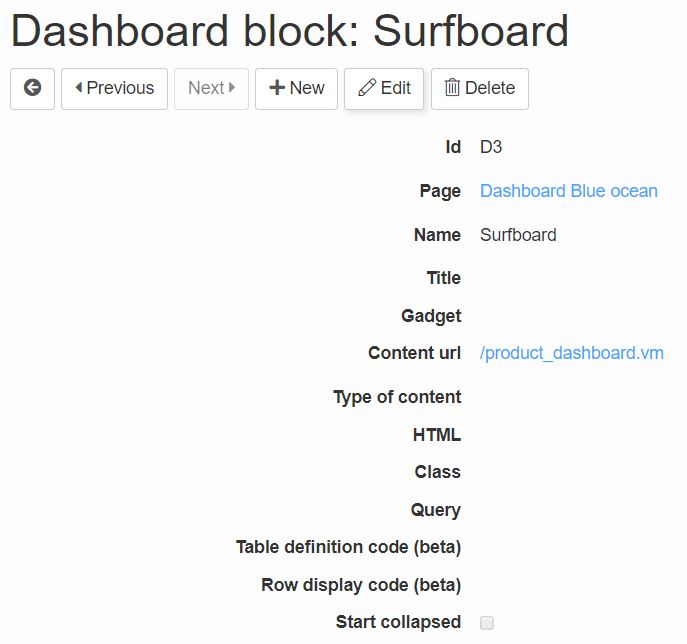
At the details of a block you can specify a Velocity file at 'Content url', see image below
How to open the dashboard?
The shorthand to open the dashboard is /engine/dashboard. If a user has more dashboard pages, the pages will be shown as tabs. To open a specific page with a url, use /engine?service=dashboard&cmd=open&page=PAGE_ID, with PAGE_ID the id of the specific dashboard page.